
Microsoft Copilot
for Small Business
Use AI inside Outlook, Teams, Word, and Excel to save time, streamline work, and reduce manual tasks—without compromising security.
Make Microsoft Copilot Work for Your Business
Microsoft Copilot for small business brings AI directly into the tools your team already uses every day—Outlook, Word, Excel, and Teams. Instead of adding another system to learn, it helps you get more out of the ones you already rely on.
For most small businesses, the challenge isn’t a lack of tools—it’s the amount of time spent on emails, documents, meetings, and repetitive tasks. Copilot helps reduce that workload by drafting content, summarizing information, and automating routine work so your team can stay focused on what actually moves the business forward.
When set up the right way, Microsoft Copilot becomes more than just an AI feature—it becomes a practical, day-to-day advantage for how your business operates.
What Microsoft Copilot Actually Does
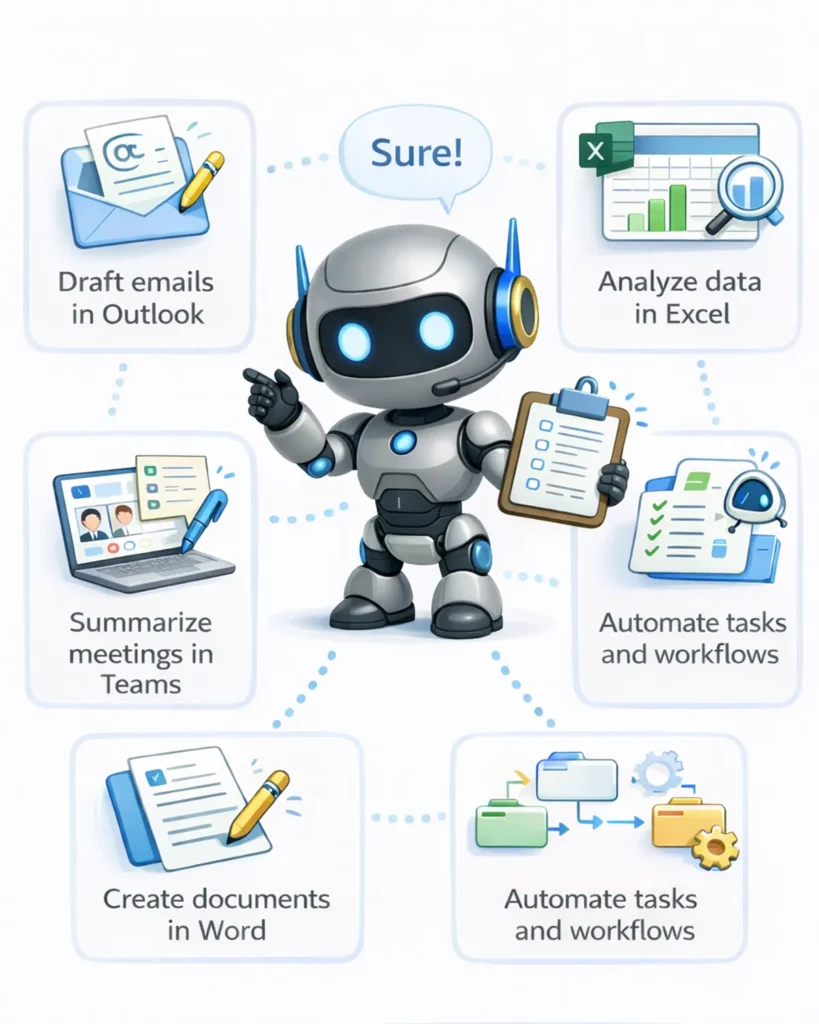
Microsoft Copilot is an AI assistant built into Microsoft 365 that helps your team work faster inside the tools they already use—without changing how they work.
It can:
- Draft and respond to emails in Outlook
- Summarize meetings and highlight action items in Teams
- Create and edit documents in Word
- Analyze data and generate insights in Excel
- Automate repetitive tasks across your daily workflows
Wondering what Copilot can do for your business? Let's find out together.
How Local Businesses Are Using Copilot Day-to-Day
Microsoft Copilot is already changing how small businesses handle everyday work. Instead of adding new software or changing your processes, Copilot works inside the tools your team already uses—helping you write faster, respond quicker, and stay organized without the usual back-and-forth.
Here are just a few examples of how Copilot fits into daily operations. Most businesses start by using it to save time on emails, documents, and meetings—and quickly find new ways to use it across their workflow. With the right setup, Copilot becomes a practical tool your team relies on every day.
- Accounting firms: Draft client emails, analyzie and summarize financial reports, verify accuracy of calculations, assist with documentation and internal notes
- Law firms: Summarize case notes, draft legal correspondence, and organize large amounts of information quickly
- Insurance agencies: Respond to client inquiries, generate policy summaries, and streamline internal communication
- HVAC & service businesses: Create and send out estimates and quotes, summarize job notes, and handle customer communication, generate and send out invoices and keep track of billing
- Construction & Remodeling companies: Draft proposals, organize project updates, and keep teams aligned across emails and meetings
With the right setup, Copilot becomes a tool your team actually uses—not just another feature that gets overlooked.
See more real examples of how our clients use Microsoft Copilot to help in their day-to-day tasks.
Where Should You Start?
Most businesses don’t
need a complex rollout to get value from Microsoft Copilot. The best approach is to start small, focus on a few high-impact areas, and expand from there.
A typical starting point looks like:
- Email and communication (Outlook): Draft responses, organize inboxes, and reduce time spent writing repetitive messages
- Meetings and collaboration (Teams): Capture notes, summarize discussions, and keep track of action items
- Documents and proposals (Word): Create drafts faster and refine content without starting from scratch
- Data and reporting (Excel): Analyze information, identify trends, and generate insights more efficiently
From there, usage naturally grows as your team gets comfortable and finds new ways to apply it in their daily work.
Make It Work the Right Way
While Copilot is easy to access, getting real value from it depends on how it’s set up and used across your business. Permissions, data access, and workflows all play a role in how effective it becomes.
That’s where we help—making sure Copilot is configured properly, aligned with your business, and actually used by your team.
Not Sure Where To Start? We'll help you find the most efficient and cost effective way to take advantage of Copilot for your business.
Turn Everyday Work into a Competitive Advantage
With the right Copilot setup, your business can move faster, stay organized, and handle growth without the usual bottlenecks.
Let's Make Copilot Work For Your Business
You already have access to Copilot—now let’s make it actually useful.
Most small businesses are paying for Microsoft 365 tools they’re barely using. We’ll help you identify where Copilot fits into your daily workflows and turn it into real efficiency—not just another feature.
What to Expect: Our Copilot Setup & Optimization Process
1. Quick Discovery Call
We learn how your business operates, where time is being lost, and where Copilot can make an immediate impact.
2. Identify High-Impact Use Cases
We pinpoint 2–5 practical ways Copilot can improve your day-to-day work (emails, meetings, reporting, quotes, etc.).
3. Copilot Setup & Configuration
We configure Copilot within your Microsoft 365 environment and ensure it works properly with your existing tools.
4. Workflow Integration
We show you exactly how to use Copilot in real scenarios—tailored to your business, not generic examples.
5. Training & Optimization
We train your team and refine usage so you’re getting real value—not just experimenting.
Schedule a Free MS Copilot Consultation
Act Today to lock in your AI advantage!
FAQs Microsoft Copilot for Small Business
AI agents go beyond chat. They can observe, analyze, and act — for example, generating reports or interacting with multiple systems.
Not necessarily. The tools are already built into Microsoft 365, but getting real value comes from configuring them correctly and using them in the right workflows—which is where we help.
Most businesses see immediate improvements in time savings, communication, and productivity. The biggest impact comes from reducing repetitive tasks and freeing up time for higher-value work.
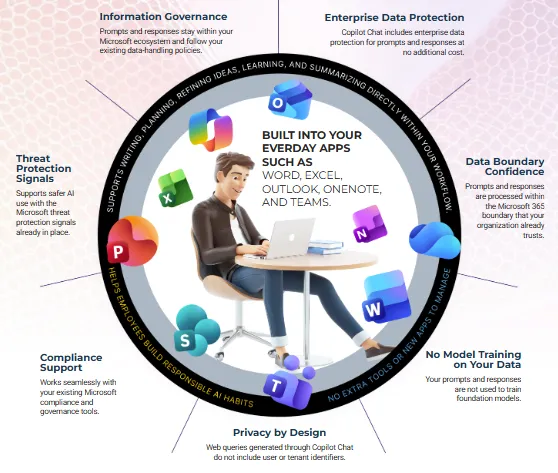
Yes—Copilot operates within your existing Microsoft 365 environment, following your organization’s permissions and security policies. We also ensure it’s configured properly to protect your data.
Copilot works within your existing tools to improve everyday tasks. Custom AI agents go further by automating entire workflows. Many businesses start with Copilot and expand from there.
We review how your business operates, identify where Copilot can make an impact, and show you practical ways to start using it right away.
ChatGPT is great for generating content and answering questions, but it doesn’t connect directly to your business systems.
Copilot works inside Microsoft 365 and can access your emails, documents, and meetings—helping you draft responses, summarize conversations, and automate tasks in your actual workflow.
No. ChatGPT and Microsoft Copilot are separate platforms and do not share data or chat history. Copilot works within your Microsoft 365 environment—using your emails, documents, and files—so you’ll start fresh, but with access to your business data.